How I Scaled a Shopify Beauty Brand with Google Shopping, Meta Ads & Klaviyo
Scaling a Shopify beauty brand comes down to running three channels at once instead of betting on one: Google Shopping for cold demand, Meta Ads for cold and warm audiences, and email for retention. This is what that looked like for one brand, with the real spend and return at each stage.
Most Shopify owners start with a sales problem. Then it becomes a tax problem, then a supply chain problem.
But sales come first, and if you’re anywhere near that stage you’ve already been buried in cold emails and DMs from people promising to scale you. Most of them can’t.
This is what actually happened with one brand.
This isn’t a hypothetical framework or a collection of best practices. Every number, decision, and lesson below comes from an actual client engagement, including the parts that were slower or messier than they look in a summary.
And nearly all of it came back to one thing that almost nobody wants to work on: a clean product feed.
Who This Guide Is For
This guide is written for:
- Shopify beauty and skincare brands building their first paid channels
- Sellers moving from Etsy to Shopify who need to replace marketplace traffic
- DTC founders spending under $10k a month on ads
- Ecommerce marketers running Google Shopping and Meta Ads together rather than in isolation
If you’re already spending six figures a month across a mature account structure, the principles hold but the tactics will feel basic.
Results at a Glance
Before the story, the numbers. Everything below is tracked platform or store data, not modelled estimates.
| Channel | Spend | Return | Period |
|---|---|---|---|
| Google Shopping free listings | $0 | ~$15,000 | 9 months |
| Google Ads (Shopping + Search) | $2,450 | ~$19,600 (~8X) | Month one |
| Meta Ads | $1,400 | ~$8,200 tracked | Initial phase |
| Klaviyo email | Free plan | 71% open rate, 5-14% CTR | Ongoing |
Two things worth flagging before you read those as a promise.
The Meta number is tracked revenue, and tracked understates reality since the iOS privacy changes. The real figure was higher, but I’m not going to guess by how much.
The 8X on Google was month one, in a category with manageable competition and a product feed we’d already cleaned up. It’s a real number, not a typical one.
About the Brand and the Starting Situation
Ella sold skincare and beauty products on Etsy when she got in touch.
Etsy was working, in the sense that orders were coming in. What it wasn’t doing was letting her build anything. Pricing was constrained, the storefront was a template, upsells weren’t possible, and the transaction fees were eating margin she couldn’t recover.
So the first decision wasn’t an ads decision. It was a platform one.
| Etsy | Shopify | |
|---|---|---|
| Traffic | Built-in marketplace demand | You generate all of it |
| Pricing control | Constrained by marketplace norms | Full control |
| Store customization | Template-bound | Full control |
| Upsells / AOV levers | Very limited | Native and app-supported |
| Transaction fees | Higher | Lower |
| Customer data | Marketplace owns the relationship | You own it |
That table is the whole tradeoff. Shopify wins on control and loses on demand. Moving platforms without building demand is how most Etsy migrations fail. Ella’s worked because we built the traffic channels alongside the migration rather than after it.
If you’re weighing that same move, I’ve written a full breakdown of whether you should migrate from Etsy to Shopify.
The Growth Sequence
We didn’t launch everything at once. Each channel was added only after the previous one was stable, and each one fed the next.
| Stage | What we did | Why then |
|---|---|---|
| 1 | Shopify migration | Own the storefront, pricing, and customer data |
| 2 | Google Merchant Center + free listings | Free demand capture, no creative needed |
| 3 | Google Ads (Shopping + Search) | Free listings proved the products sell, so pay to accelerate |
| 4 | Meta Ads | Pixel had warmed on organic traffic, Q4 approaching |
| 5 | Klaviyo email | Enough order volume to make a list worth building |
| 6 | International expansion | Domestic channels stable and profitable |
The sequencing is the actual strategy. Most brands run this backwards, launching paid social first because it feels like marketing, then wondering why acquisition costs never come down.
Here’s the same thing as a system rather than a list:
Google Merchant Center
        ↓
   Free Listings  ──────► organic revenue, zero spend
        ↓
   Paid Shopping  ──────► accelerate what already sells
        ↓
      Shopify     ──────► store traffic
        ↓
  Meta Pixel learns
        ↓
     Meta Ads     ──────► create new demand
        ↓
      Klaviyo     ──────► retain, repeat purchase
        ↓
  Higher LTV, lower blended CAC
Every arrow is a dependency. Skip a step and the one after it gets more expensive.
The Strategy: Funnelling and Diversification
The core idea: never run one channel. Google Merchant Center captures cold demand, Meta Ads covers cold and warm, email handles warm and returning. Different audiences need different messages, and spreading across channels protects you when one gets expensive.
| Channel | Audience temperature | Job it does |
|---|---|---|
| Google Merchant Center | Cold | Capture people already searching |
| Meta Ads | Cold and warm | Create demand, retarget browsers |
| Email (Klaviyo) | Warm and hot | Repeat purchase, margin recovery |
What Is a Cold Audience?
A cold audience is someone who has never interacted with your brand. They have not visited your site, followed your social accounts, or bought anything. They need proof you are a real business before they will spend money, which usually means shipping policy, returns, and social proof rather than a discount.
What Is a Warm Audience?
A warm audience has engaged but not purchased. They viewed a product, watched a video, added to cart, or visited your site. They already know who you are, so the job is removing whatever stopped them the first time.
What Is a Hot Audience?
A hot audience has already bought from you. They need no convincing about legitimacy, so the job is showing them what is new and worth buying next. This is the cheapest revenue in ecommerce and the most commonly ignored.
This chart by Tamie explains funnelling better than I can in a paragraph.
Take Jeff. He’s already bought from you, so he’s hot. Show him the new collection.
Now take Elena. She’s never heard of you. Before she spends anything she wants to know your shipping policy, your returns, and whether you’re a real business.
Show them the same ad and you waste budget on both. That’s the whole argument for funnelling.
There’s a second reason to diversify, and it’s less about strategy than survival. Ad costs rise. Algorithms shift. Accounts get restricted without warning. A brand running three channels absorbs that. A brand running one doesn’t.
Channel 1: Google Merchant Center and Google Shopping
We started here deliberately, and the reasoning matters more than the tactic.
Google Shopping captures existing demand. Someone typing “beauty balm” or “vitamin C serum” is already in the market. That’s the cheapest revenue available to a new store, and it doesn’t need creative, a brand, or an audience. It needs a clean product feed.
It also does something quieter: it generates the early site traffic that warms your Meta pixel, so when you do start paying for social, you’re not starting from zero signal.
What Is Google Merchant Center?
Google Merchant Center is the free platform where you upload your product catalogue so it can appear across Google’s shopping surfaces. It is not an ads account. It is the data layer that Google Ads, free listings, and increasingly AI shopping results all read from.
What Are Google Free Listings?
Free listings display your products in Google Shopping results at no cost and without a Google Ads account. You submit an approved product feed through Merchant Center and eligible products surface organically alongside paid results.
Google Merchant Center lets you submit products for free. Connect your Shopify store through the Google Sales Channel and you’re running.
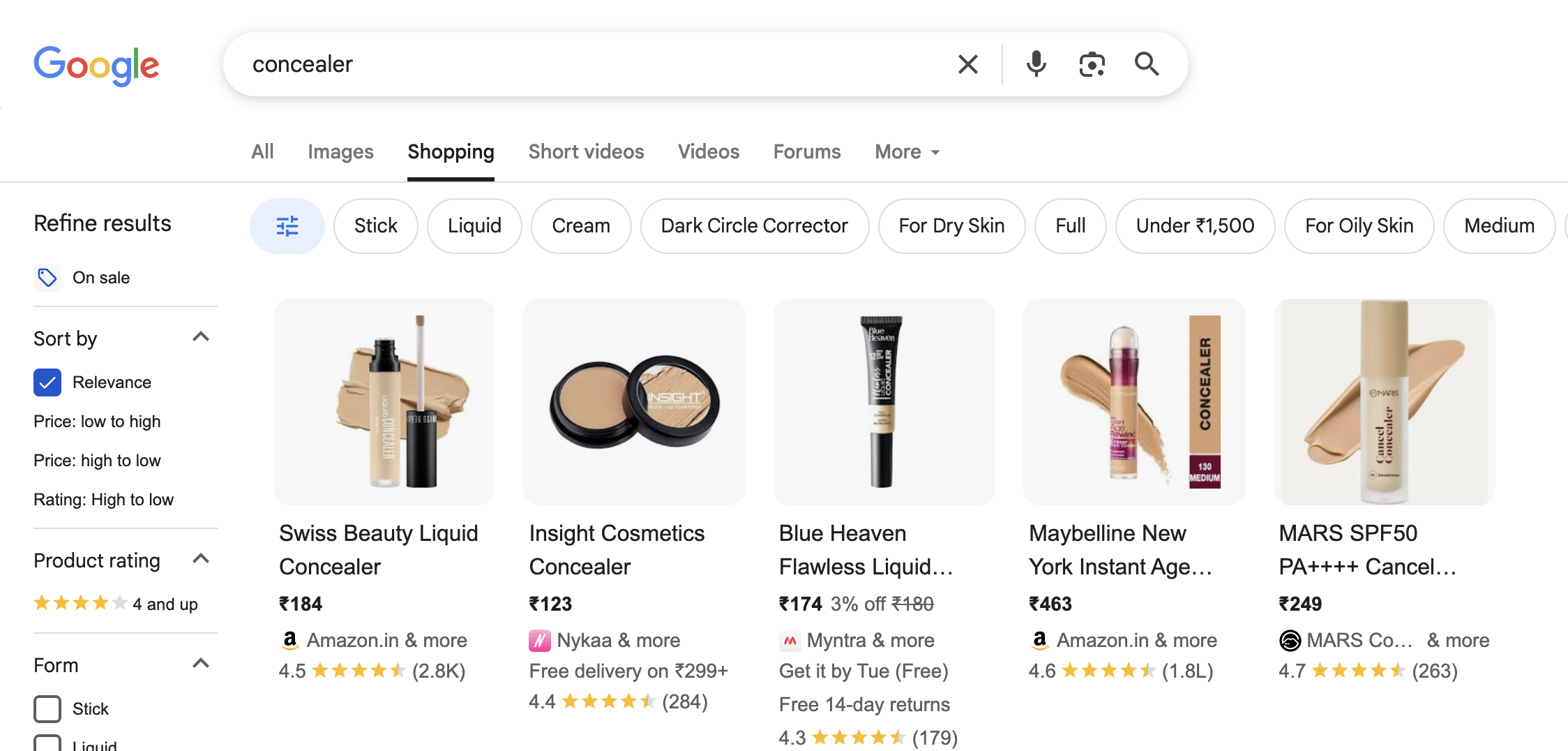
Those listings are the free program at work.
Ella did $15,000 in revenue from free listings alone, over nine months, with zero ad spend.
Why Feed Quality Is the Highest-Leverage Work
The feed quality work that improves free listings is the same work that improves paid Shopping. Titles, GTINs, image quality, price accuracy, availability. There’s no separate organic optimization to do.
In 2026 that feed now feeds a third thing as well: AI shopping surfaces. One clean catalogue improves free listings, paid Shopping, and AI discovery simultaneously. That makes it one of the highest-leverage improvements you can make early on, and almost nobody does it first.
Step Two: Paid, Once Free Had Proven Demand
Free sales were coming in consistently, but there was a limit, and the limit was control. It’s a car with no accelerator. It moves, but you don’t decide how fast.
We waited until free listings had proven the products could sell before spending anything. That sequencing is the actual lesson: let the free channel validate demand, then pay to accelerate what already works.
So we moved into paid Google Ads at $10 a day, running two campaign types.
| Campaign type | What it’s for | Control level |
|---|---|---|
| Standard Shopping | Manual bidding and structure | Highest |
| Shopping (feed-driven) | Let Google match products to queries | Medium |
| Search | Target specific keywords, defend brand terms | High |
| Performance Max | Automated across all Google inventory | Lowest, most opaque |
Shopping campaigns find customers on their own. You hand over a product feed and the bidding models handle placement.
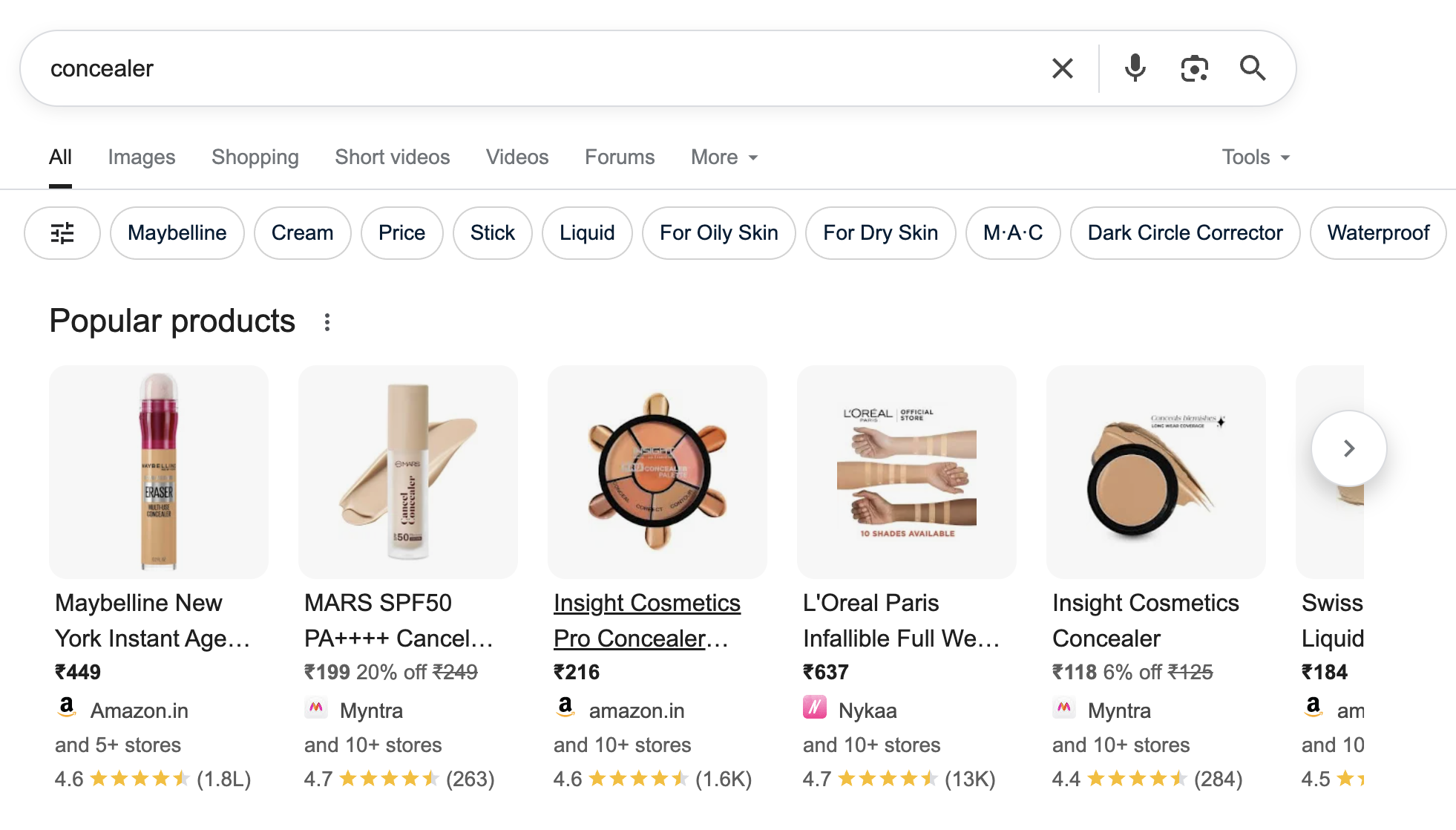
Search campaigns gave us precision. We targeted terms like “best beauty balm for mom” and “eyeliners under $50,” and it kept competitors off Ella’s brand keywords. That second job is underrated. Brand-term defence is cheap and it stops someone else buying customers you already earned.
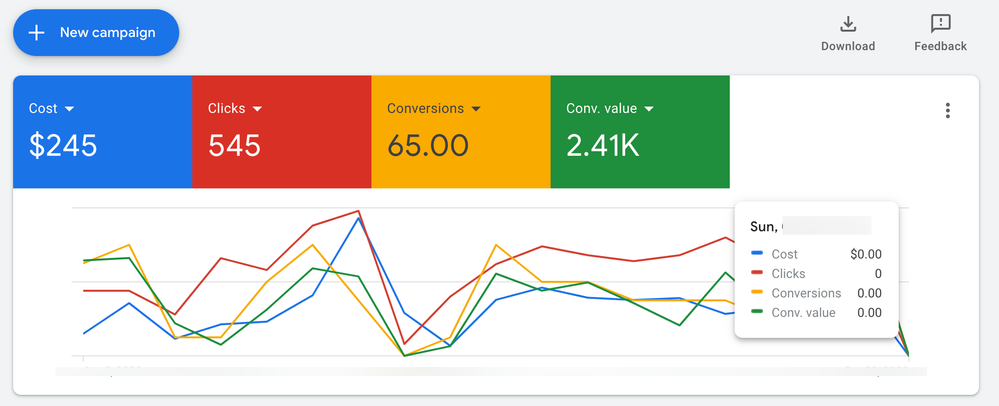
The result: $2,450 in spend returned roughly $19.6K in month one. Around 8X.
I start campaigns conservatively and let them settle before scaling. That patience is doing more work in this number than the targeting is.
What Is Performance Max?
Performance Max is Google’s fully automated campaign type. It runs across Search, Shopping, YouTube, Display, Discover, Gmail, and Maps from a single campaign, using your feed and creative assets. It is easy to launch and difficult to diagnose, because Google reports limited detail on where spend actually went.
Two revenue sources were now running, one free and one paid, both feeding off the same product feed. Q4 was coming and Ella wanted to scale.
Why We Didn’t Start With Meta Ads
This is the question I get asked most about this engagement, because paid social is where most people instinctively begin.
Four reasons we went to Google first.
The pixel had no data. Meta’s targeting and optimization run on conversion signals. A brand new pixel on a brand new store has nothing to learn from, so early Meta spend is partly paying for Meta’s education rather than your sales. Sending organic Google traffic to the site first meant the pixel had something to work with before we paid for a single click.
Merchant Center was free. Free listings cost nothing and required no creative. Spending money on paid social while a free channel sat unused would have been backwards.
The demand already existed. People were searching for these products. Capturing intent that already exists is cheaper than manufacturing new intent, every time. You start with the cheap revenue and graduate to the expensive kind.
Meta learns better with traffic. Warm audiences, retargeting pools, and lookalike seeds all need site visitors. Google gave us those visitors for free, which meant Meta launched into a warmer account than it otherwise would have.
The general rule I’d draw from it: if people are already searching for your product, capture that first. Use paid social to expand demand, not to discover whether demand exists.
Channel 2: Meta Ads
Google was capturing demand that already existed. Meta’s job was different: create demand among people who weren’t looking.
The Groundwork, Before Any Campaign
-
Set up a product feed.
-
Connected the Meta pixel to Ella’s Shopify store.
-
Verified her domain and enabled CAPI through Shopify’s integration.
-
Created Facebook and Instagram shops so products could be tagged in her social posts.
Get those four right and everything downstream works. Get them wrong and you’ll spend months optimizing against broken data, which is the single most common reason a competent media buyer produces bad results.
What Is CAPI?
The Conversions API sends conversion events to Meta directly from your server rather than relying on the browser pixel alone. Since iOS privacy changes broke a large share of browser-based tracking, CAPI is what keeps Meta’s optimization fed with accurate data. On Shopify it is a native integration, not a custom build, and there is no good reason to skip it.
What Is a Lookalike Audience?
A lookalike audience is one Meta builds by finding users who resemble a source audience you provide, such as past purchasers or high-value customers. It only works if the source has enough volume. Building lookalikes from a handful of conversions produces noise, which is why we did not lead with them.
The Campaign Structure, and Why It Was This Simple
First campaign ran at $50 a day. We spent $1.4K and tracked about $9K back, and the real number was higher, because platform tracking has been lossy since the iOS privacy changes. We ran UTMs to validate against store data rather than trusting the dashboard.
On the best days, cost per sale dropped to $1.
The structure was deliberately simple, and the reason is data. Lookalikes need conversion volume to be worth anything, and we didn’t have it yet. Building elaborate audience segmentation before you have data is a common early mistake, so we didn’t.
-
Broad Audience ($5×5).
-
Retargeting Campaign ($10×1).
-
Engagement Campaign on the Ad tagged to the post ID for social proof ($10×1).
-
Lookalike Audience based on video views and page views combined ($5 × 1).
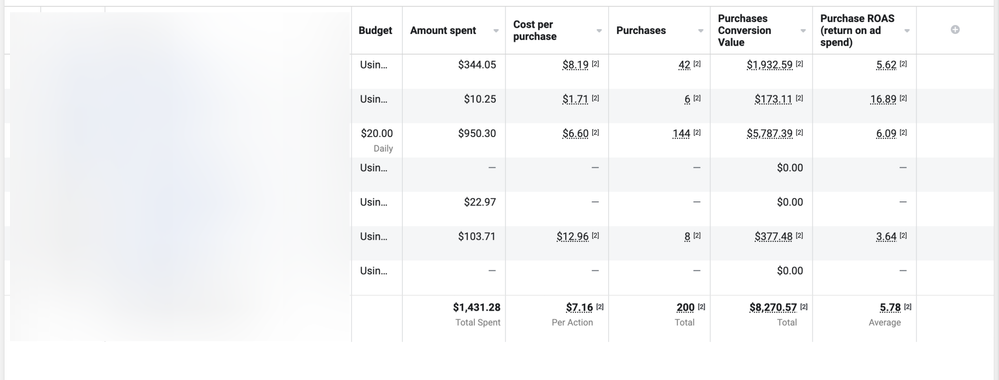
$1.4K spent, $8.2K back, tracked.
That post-ID engagement campaign is the underrated one. Running ads against a single post piles likes, comments, and shares onto one creative instead of scattering them across duplicates. A new customer landing on an ad with visible engagement converts better than one landing on a ghost town.
This is a starting structure, not a finished one. We made deeper changes as we went. But it’s the right shape to begin with.
If creative starts fatiguing as you scale, I’ve written separately on fixing ad fatigue and a broader Facebook ads strategy for Shopify brands.
Channel 3: Klaviyo and Email
Three channels were now live, two paid and one free. What was missing was the cheapest revenue in ecommerce: talking to people who already bought.
Email is the only channel here where you own the audience outright. No platform can raise its price or restrict your account.
The Setup Checklist
-
Get a Klaviyo account.
-
Add your domain and verify it.
-
Connect your Shopify store.
-
Add DKIM and SPF records for deliverability.
-
Run your emails through Mail Tester before sending.
We skipped elaborate flows at first. Shopify’s abandoned cart recovery was already doing that job, and rebuilding it in Klaviyo would have been effort spent duplicating something that worked. We focused on campaigns instead.
71% open rate against an industry average around 39%. Click rates between 5% and 14% against a typical 1.92%.
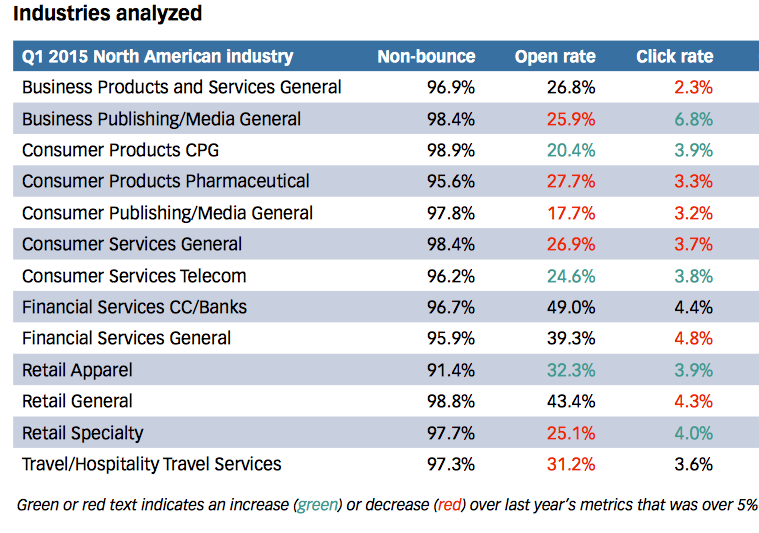
Those numbers are high partly because the list was small and recent. A fresh list of actual buyers always outperforms a large aged one, which is exactly why list hygiene matters more than list size.
The content was simple on purpose. New products a customer might actually want, with recommendations pulled from Shopify’s recommendation engine so the suggestions matched what they’d already bought.
Channel 4: AI Shopping, The One That Didn’t Exist in 2024
If I were building this today, there’d be a fourth channel, and it’s the one almost nobody is set up for.
More shoppers now start product research inside an AI assistant instead of a search bar. They ask ChatGPT, Perplexity, or Claude for a recommendation, or they see a Google AI Overview before they see a single blue link. That’s a genuinely new discovery surface.
The important part: visibility there is organic. It is decided by how readable your product data is, not how much you spend. For a small brand competing against companies with far bigger budgets, that is the most level playing field available right now.
Why This Is an Extension of Feed Work, Not a New Discipline
Everything that makes your catalogue legible to Google makes it legible to an AI assistant. Clean titles, accurate attributes, structured data, honest availability. If you did the Merchant Center work properly, you are most of the way there.
What’s different is the layer above the feed: whether AI systems can crawl your site at all, and whether your pages carry the structured markup they read.
The Four Things That Decide Whether You Show Up
1. Crawler access. AI systems use their own crawlers, and they are separate from Googlebot. If your robots.txt blocks them, or your CDN has an AI-bot rule enabled, you are invisible regardless of how good your products are. Cloudflare in particular has shipped AI-bot blocking on by default in some configurations, and it silently returns 403 to crawlers while your robots.txt looks perfectly fine.
2. Product schema. Structured data on product pages tells a machine what your price, availability, rating, and specifications actually are, rather than making it guess from your layout. Product schema is what turns a page into parseable data.
3. A clean product feed. Shopping surfaces read catalogues, not paragraphs. Google’s Shopping Graph now spans roughly 60 billion listings, and your feed is your entry into it.
4. llms.txt and agent discovery files. A newer convention: a plain-text file that tells language models what your site is and points them at what matters. Shopify has begun deploying these across stores by default, which means many merchants already have one and don’t know it.
Product Feed vs llms.txt: What’s the Difference?
A product feed is structured catalogue data submitted to a specific platform, like Google Merchant Center. It answers “what do you sell, at what price, in what quantity.”
llms.txt is a plain-text summary of your site written for language models reading your site directly. It answers “what is this business and where is the content worth reading.”
Feeds serve shopping surfaces. llms.txt serves assistants. You want both, and they are not substitutes.
Where to Start
If this is new, these three cover the practical setup:
-
How to get your products listed on ChatGPT, including the robots.txt fix most stores miss
-
What Google’s UCP means for Shopify brands, the protocol side of it
-
Shopify’s agentic commerce and llms.txt rollout, what the platform shipped by default
I’ve also built free tools for checking AI crawler access, generating an llms.txt file, and generating product schema, if you’d rather test your store than read about it.
The brands treating product data as a growth asset instead of admin work are the ones showing up here. Most of their competitors still think of the feed as something the Shopify app handles.
Common Mistakes I See Brands Make
Most of these I’ve either made or watched a client make.
Launching paid before the feed is clean. Every downstream channel reads from that feed. A messy one caps your ceiling on all of them at once.
Building lookalikes with no conversion data. Lookalikes need a seed audience with volume. Early on, broad targeting genuinely outperforms clever segmentation.
Trusting platform-reported revenue. Meta and Google both report generously and inconsistently with what your store recorded. Reconcile against Shopify, not the ad dashboard.
Migrating off a marketplace without a demand plan. Etsy sends you traffic. Shopify doesn’t. Build the channels first or in parallel.
Treating email as a launch task. It’s the only audience you own, and it compounds. Starting it late costs you the customers you already paid to acquire.
Scaling budget too fast. Campaigns need to settle. Aggressive scaling resets learning and usually costs more than the patience would have.
Ignoring AI crawlers. A single blocked user-agent can remove you from an entire discovery channel, and nothing in your analytics will tell you it happened.
What I’d Do Differently Today
The three-channel structure holds. What I’d change is order and emphasis.
Start with data hygiene, not campaigns. Feed quality now drives free listings, paid Shopping, and AI discovery at the same time. It’s one of the highest-leverage improvements available early on, and almost nobody does it first.
Expect automation to handle the targeting. Advantage+ and Performance Max have absorbed most manual audience work. Your edge moved to creative, offer, and the quality of the signals you feed back.
Treat list hygiene as a P&L line. Under active-profile billing, a bloated list costs you every month and hurts deliverability while it does.
Reconcile your numbers. Platform-reported revenue and actual store revenue diverge, often badly. Track the KPIs that actually matter for a Shopify business instead of trusting an ad dashboard.
Build trust, not just traffic. Cheap clicks into a store nobody believes in convert badly. More on that in trust vs traffic.
Add AI visibility to the launch checklist. It costs almost nothing and most competitors haven’t done it yet.
Tools Used
Nothing exotic. The whole thing ran on:
| Tool | What it did |
|---|---|
| Shopify | Storefront, checkout, abandoned cart recovery, product recommendations |
| Google Merchant Center | Product feed and free listings |
| Google Ads | Shopping and Search campaigns |
| Google Sales Channel (Shopify app) | Feed sync between Shopify and Merchant Center |
| Meta Ads Manager | Campaign management |
| Meta Pixel + Conversions API | Conversion tracking |
| Klaviyo | Email campaigns and list management |
| Google Analytics | Traffic and behaviour reporting |
| UTM parameters | Validating platform-reported revenue against reality |
| Shopify Reports | Source of truth for actual revenue |
| Mail Tester | Deliverability checks before sending |
The Framework
Strip away the platforms and the sequence is always the same.
- Capture existing demand. Someone is already searching for what you sell. Be findable before you try to be persuasive.
- Create new demand. Once you know what converts, go find people who weren’t looking.
- Retain the customers you paid for. Email costs almost nothing and compounds.
- Own your data. Platforms rent you attention. Your list and your store data are the only assets you keep.
- Improve your product feed. It feeds search, shopping, and now AI discovery at once.
- Repeat.
Every Shopify beauty and skincare brand I’ve worked with that scaled sustainably converged on some version of that. The ones that struggled were usually running one channel, judging it on the platform’s own numbers, and scaling it faster than it could learn.
Ella has since expanded into Canada and Europe and is doing roughly 3X her original overall revenue.
About Nikhil Sharma
I’m Nikhil Sharma. I run data and operations engineering for a DTC brand full-time, and I help other Shopify brands with paid ads, email, and the systems underneath them. I’ve built multiple brands in Tier-I markets, and I write about the unglamorous parts of ecommerce that actually move margin.
If you want a second pair of eyes on your ads, tracking, or feed setup, book a consultation and we’ll talk about your store specifically
Frequently asked questions
How much budget do you need to start scaling a Shopify beauty brand?
Should I use Google Shopping or Meta Ads first?
Is Google Merchant Center free?
Are Google free listings still available in 2026?
Google Shopping vs Performance Max: which should I run?
Should I run Search and Shopping campaigns together?
What is a good ROAS for a beauty brand on Google Shopping?
Should I use Advantage+ Shopping Campaigns?
How long does it take for Meta Ads to learn?
When should I install Klaviyo?
Is Klaviyo's free plan enough for a small store?
Should I move from Etsy to Shopify?
Can Google Shopping work without product reviews?
Can AI assistants like ChatGPT recommend my Shopify store?
What is the difference between a product feed and llms.txt?
Does this work for a skincare brand specifically?
Does this strategy work for non-beauty brands?
Get new posts in your inbox
Occasional notes on Shopify, paid ads, and what I learn. No spam.
Thanks — check your inbox to confirm.

Nikhil Sharma
I'm Nikhil Sharma. I write about Shopify, paid ads, email, and the systems I build for the DTC brands I work with.